
릴리즈 노트 Ver. 2.9
2023년 12월 16일 법틀이 법틀 클라우드서비스를 사용하시는 고객들의
사용성 개선을 위해 신규기능 추가 및 사용성 개선을 진행합니다.
2023년 12월 16일 Ver. 2.9 릴리즈 노트
2023년 마지막 업데이트
신규기능 6 + 개선 1
6+1 총 7가지 기능을 안내합니다.
◆ 사용성 개선
1. 홈화면 개선
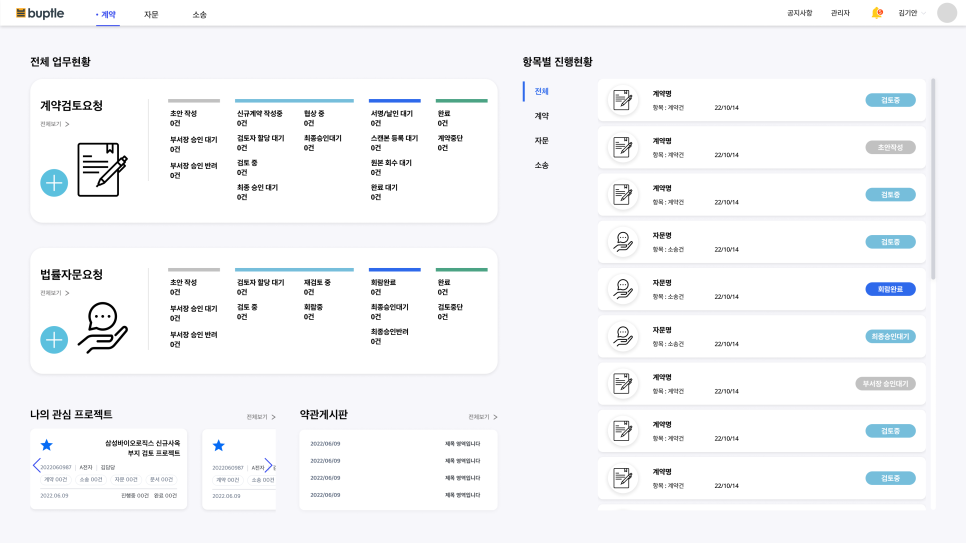
법틀에 로그인 후 첫번째로 보이는 홈 화면이 변경되었습니다.
기존의 업무현황 화면을 개선하여, 미확인 알람과 로그인한 유저가 해야할 업무를 빠르게 확인할 수 있도록 UI를 변경했습니다.
변경된 화면에서는 나의 할일을 보다 빠르게 확인하고 이동 할 수 있으며, 법무팀 혹은 관리자의 경우 현황화면도 제공됩니다.
▶ 나의 업무 확인
이번 업데이트로 로그인한 유저가 해야할 일을 보다 빠르게 확인하고, 이동할 수 있도록 개선되었습니다.
또한 일반유저(현업담당자) 와 법무팀에게 권한별 다른 화면 제공하여, 법무팀에게는 전체 현황을 볼 수 있도록 해줍니다.
* 화면이 많이 변한것 같아 놀라셨나요? 하루만 지나면 새로운 화면이 제공하는 편리함에 이전 화면은 기억도 안날지 모릅니다 ^^
< 변경전 화면 >
< 변경 후 화면 - 상단 >
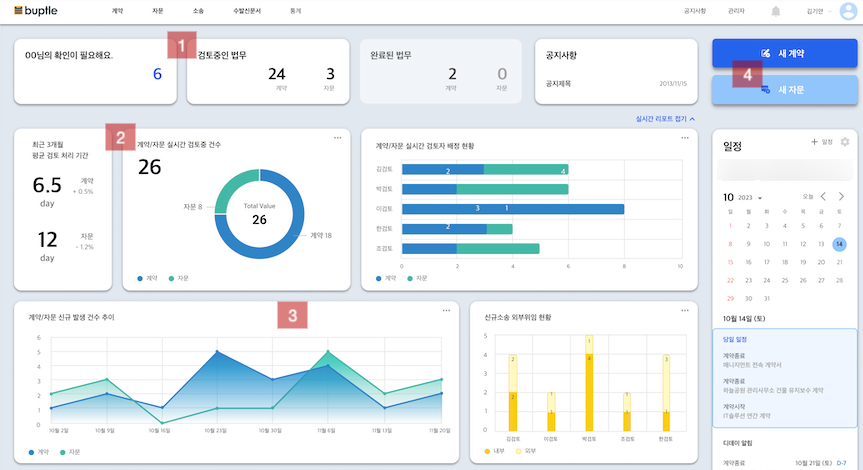
- 1 ) 상단 부분 현재 로그인한 유저가 해야할 일의 숫자를 보여주며 클릭 시, 해당 업무 리스트를 보여주고 바로가기를 지원합니다.
- 2 ) 해당 부분은 유저의 권한에 따라 보여지며, 법무팀에게 보여지는 실시간 리포트 현황 화면 입니다. * 일반유저 (현업 담당자) 에게는 해당 부분이 표기되지 않습니다.
- 3 ) 해당 부분은 유저의 권한에 따라 보여지며, 법무팀에게 보여지는 실시간 리포트 현황 화면 입니다. * 일반유저 (현업 담당자) 에게는 해당 부분이 표기되지 않습니다.
- 4 ) 신규 계약 혹은 자문을 생성하기 위한 버튼을 제공합니다.
< 변경 후 화면 - 하단 >
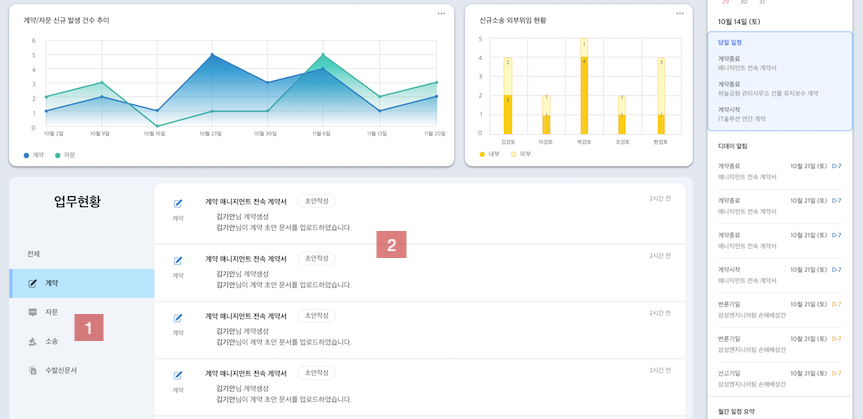
- 1 ) 계약, 자문, 소송 등 각 업무별 메뉴를 제공합니다.
- 2 ) 각 메뉴별 업무 리스트를 보여주고 클릭 시 바로가기를 제공합니다.
◆ 신규 업데이트 기능
1. 법무캘린더
법무 캘린더 기능이 새롭게 제공됩니다.
이제 계약의 시작일 종료일, 소송 일정을 캘린더에서 알람을 받고, 빠르게 확인할 수 있습니다.
<당일 일정>, <디데이 알람>, <월간 일정 요약> 리스트를 한눈에 확인 할 수 있도록 제공하여,
일정을 놓치지 않고 업무를 처리할 수 있습니다.
* 향후 구글, 네이버 등의 캘린더와 연동하여 업무를 관리할수 있도록 제공해 드릴 예정이니 기대해 주세요 ^^
▶ 캘린더
1. 일정
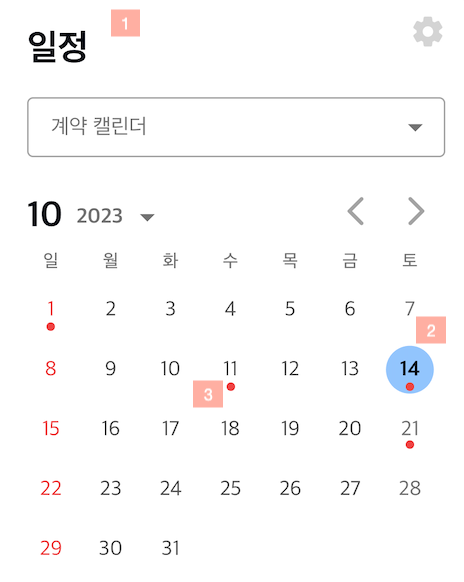
- 1 ) 홈화면 우측 캘린더 화면에서 월단위 전체 업무를 확인 할 수 있습니다.
- 2 ) 오늘 날짜는 색깔로 표기되며, 달력의 날짜를 클릭하면 해당 날짜에 확인이 필요한 리스트를 확인 할 수 있습니다.
- 3 ) 일정 확인이 필요한 업무가 있는 날은 색깔로 구분되어 표기 됩니다.
2. 당일 일정
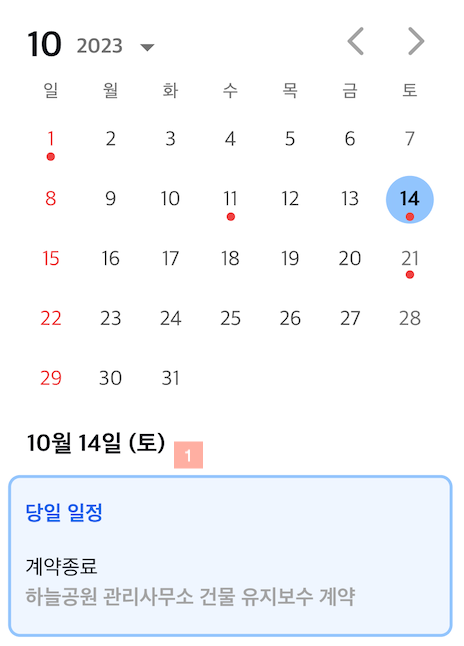
- 1 ) 오늘 날짜 기준의 확인해야할 업무( 계약의 시작, 종료 / 소송 관련 일정 )를 보여줍니다.
- 2 ) 날짜를 클릭하면 해당 날짜의 업무를 확인 할 수 있고, 업무 클릭 시 해당 업무화면으로 이동합니다.
3. 디데이 알람
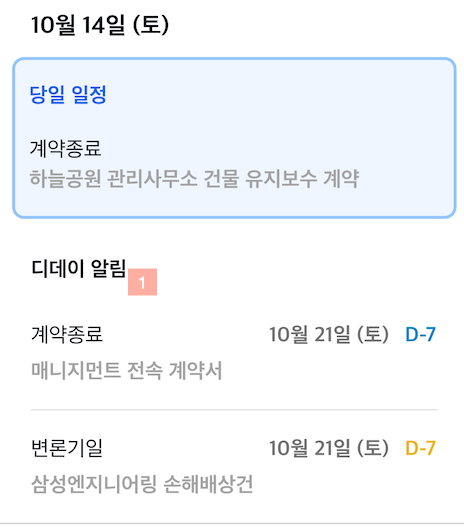
- 1 ) 캘린더에 선택된 날짜를 기준으로 기 설정된 디데이 알림이 표기 되며, 클릭 시 바로 해당 업무 화면으로 이동합니다.
* 현재는 계약 시작, 종료 / 소송의 대법원 정보 기일이 표기되며, 향후 업데이트 시 내가 만든 일정에 대한 알림도 제공해 드릴 예정이니 업데이트 될 법틀의 캘린더 기능을 기대해 주세요 ^^
4. 월간 일정 요약
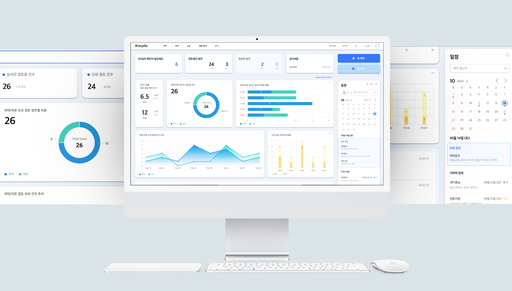
- 1 ) 캘린더에 표기된 월 기준 계약과 소송의 월 단위 일정 전체를 요약 표기해 제공합니다.
2. 법무팀 공유
법무팀 공유 기능을 새롭게 제공합니다.
법무팀 공유 기능은 기존의 진행상황에 관련인 전체가 볼수 있는 코멘트나 파일 외에 법무팀만 별도로 공유 할 수 있는 법무팀만의 공간입니다.
상세화면에서 각 업무 별 법무팀 공유 내용을 확인 할 수 있으며, 법무팀 공유 전체 현황을 볼 수 있는 별도의 창을 제공해 드립니다.
▶ 법무팀 공유
1. 업무별 법무팀 공유
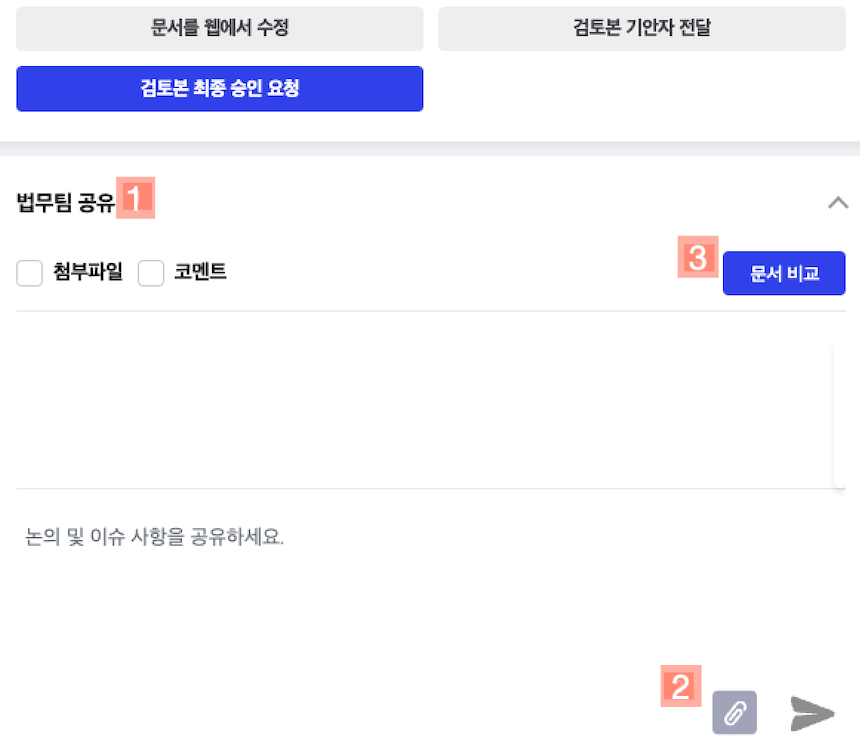
- 1 ) 각 업무 별 상세화면 우측 진행상황 창 상단에 법무팀 공유 항목이 추가되었습니다.
- 2 ) 법무팀만 공유할 수 있는 코멘트와 첨부파일을 등록 할 수 있습니다.
- 3 ) 첨부파일 내 문서를 비교할 수 있도록 문서비교 기능을 제공합니다. (Docx, PDF)
2. 법무팀 공유 현황

- 1 ) 리스트 우측 상단에 '법무팀 공유' 탭이 제공되며, 클릭 시 현황 화면으로 이동 합니다.
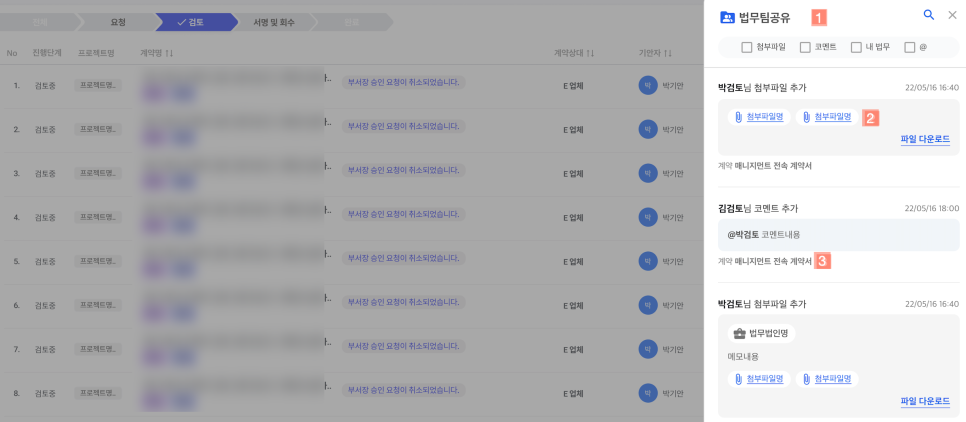
- 1 ) 리스트 화면 우측 법무팀 공유 탭 클릭 시, 모든 업무의 법무팀 공유 현황을 확인 할 수 있습니다.
- 2 ) 각 업무 별 상세화면 우측 진행상황 창 상단에 법무팀 공유 항목이 추가되었습니다.
- 3 )
3. 연관법무 자동추천
연관법무 추천 기능을 새롭게 선보입니다.
기존의 연관법무 검색 및 등록 기능이 아닌 법틀이 이전 업무들의 분석을 통해 새로 생성하는 업무와 유사한 기존 업무를 찾아내어 자동 추천하는 기능입니다.
연관법무 추천 기능으로 유사한 업무, 작년에 이어 체결하는 연장 계약 등의 연관 업무를 빠르게 확인해 보세요.
연관법무로 등록된 문서와 연관법무 문서의 비교 기능도 제공합니다.
▶ 연관법무 자동추천
1. 연관법무 자동추천 기능
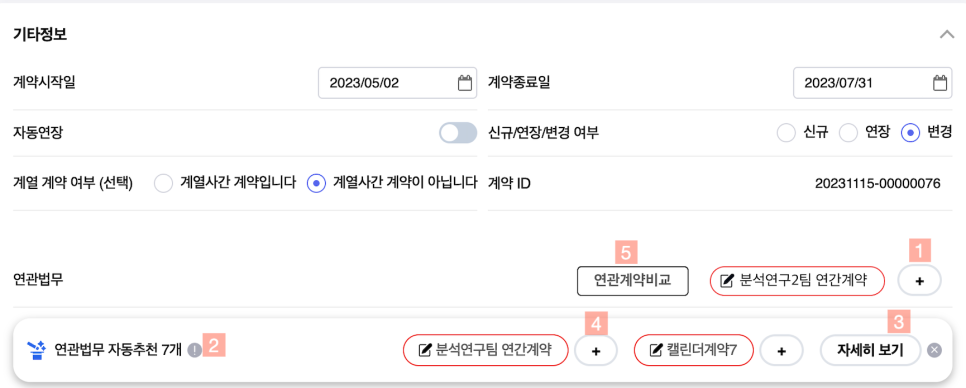
- 1 ) 기존 기능을 그대로 사용하여 수동으로 연관법무를 추가할 수 있습니다.
- 2 ) 연관법무 자동추천은 최대 7개의 연관 업무를 자동으로 추천해 드리며, 연관도가 높은 순서대로 표기 됩니다.
- 3 ) 자세히 보기를 통해 전체 추천 업무를 확인 하거나 추가적인 검색을 할 수 있습니다.
- 4 ) ( + ) 버튼을 통해 자동 추천된 연관법무를 빠르게 등록해 보세요.
- 5 ) 연관계약비교 버튼을 통해 기본 문서와 연관 문서를 비교할 수 있습니다.
4. 최근사용 계약 템플릿 + 즐겨찾기
기존의 템플릿 선택 화면에 최근 사용 템플릿과 즐겨찾기 기능을 추가했습니다.
이제 내가 사용할 템플릿을 보다 빠르게 선택하고 관리 할 수 있습니다.
▶ 최근사용 템플릿 + 즐겨찾기
1. 최근사용 템플릿
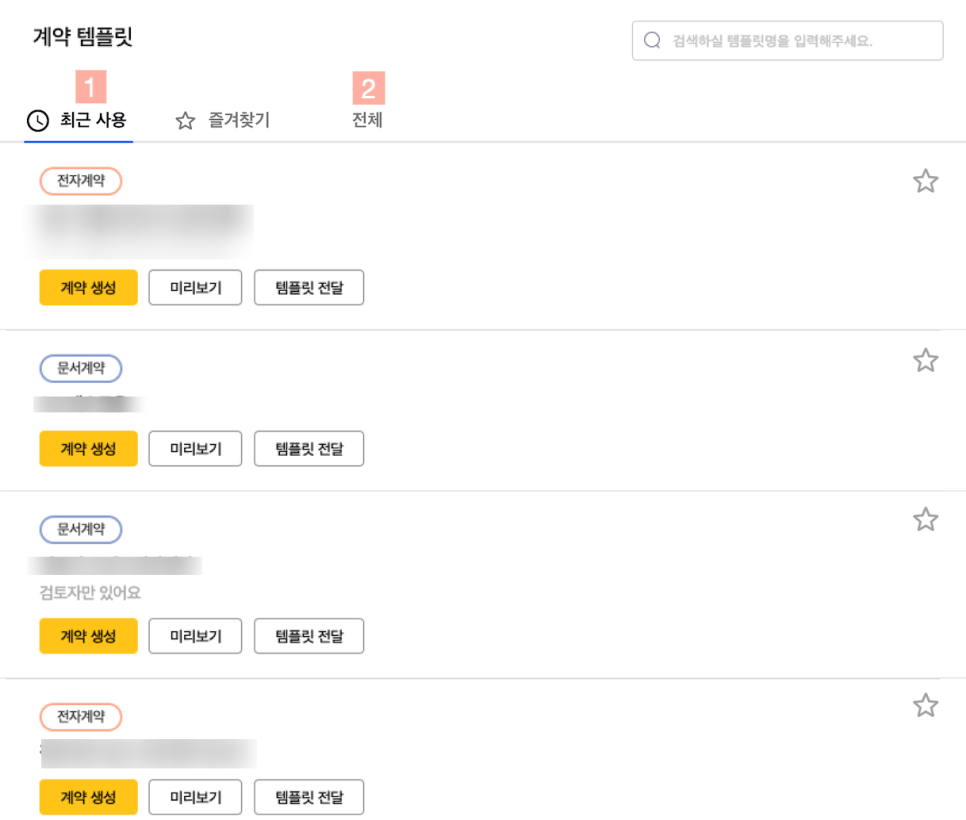
- 1 ) 계약 템플릿 화면에서 최근 사용한 템플릿이 있는경우 최근 사용템플릿을 우선적으로 보여줍니다. 유사한 계약을 많이 체결하는 담당자의 경우 최근 계약 템플릿으로 빠르게 원하는 템플릿을 선택해 업무를 진행 할 수 있습니다
- 2 ) 기존의 전체 템플릿 탭을 통해 전체 템플릿을 확인 할 수 있습니다.
2. 즐겨찾기
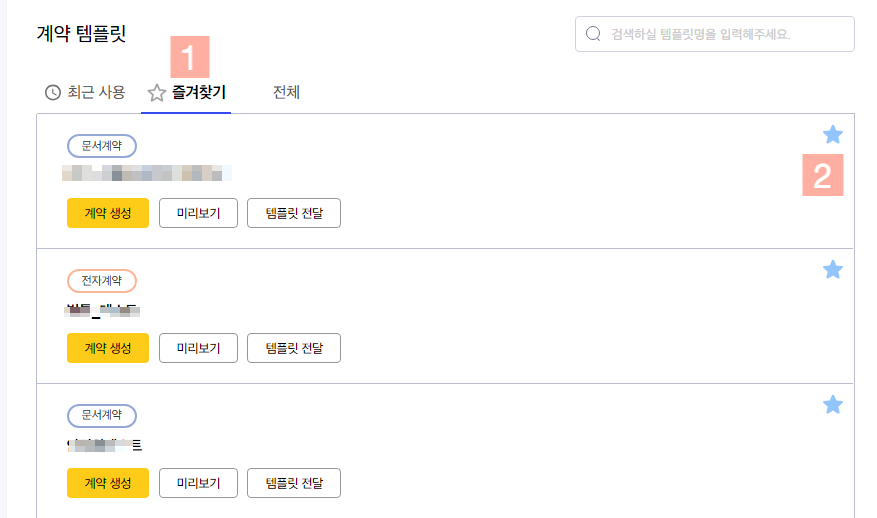
- 1 ) 즐겨찾기 탭을 선택하면 자신이 등록한 즐겨찾기 템플릿을 보여줍니다.
- 2 ) 우측 별표시를 체크하면 즐겨찾기 템플릿으로 등록 / 해제 할 수 있습니다. 이제 자주 사용하는 템플릿을 즐겨찾기로 등록하여 빠르게 업무를 진행해 보세요.
5. 계약리스트 항목 편집
계약 리스트화면에 보이는 항목을 각자가 원하는 항목이 표기 되도록 동적 편집 기능을 제공합니다.
이제 원하는 항목을 리스트에 추가해 보세요.
▶ 계약리스트 항목 편집
1. 계약리스트 항목 편집 기능
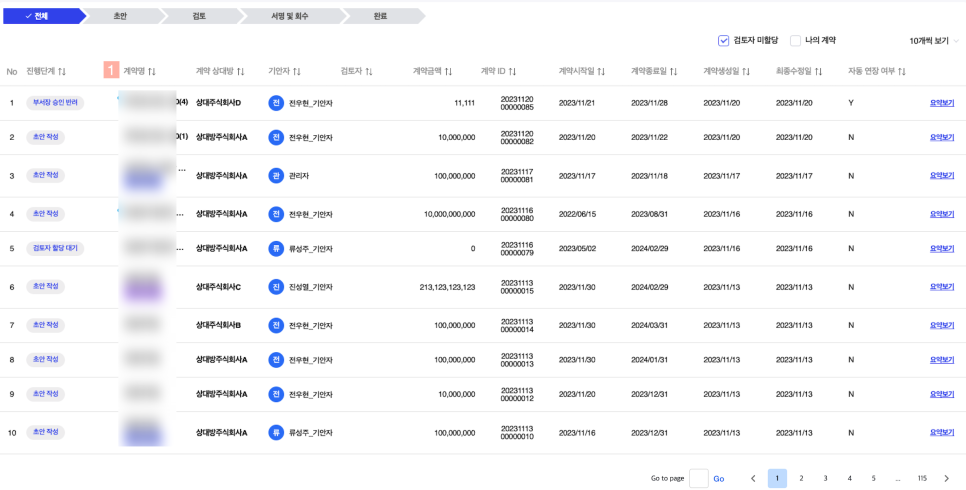
- 1 ) 고정된 항목으로 업무 현황을 확인 할 수 있었던 리스트 항목을 원하는 항목으로 변경 할 수 있는 동적 편집 기능을 제공 합니다.
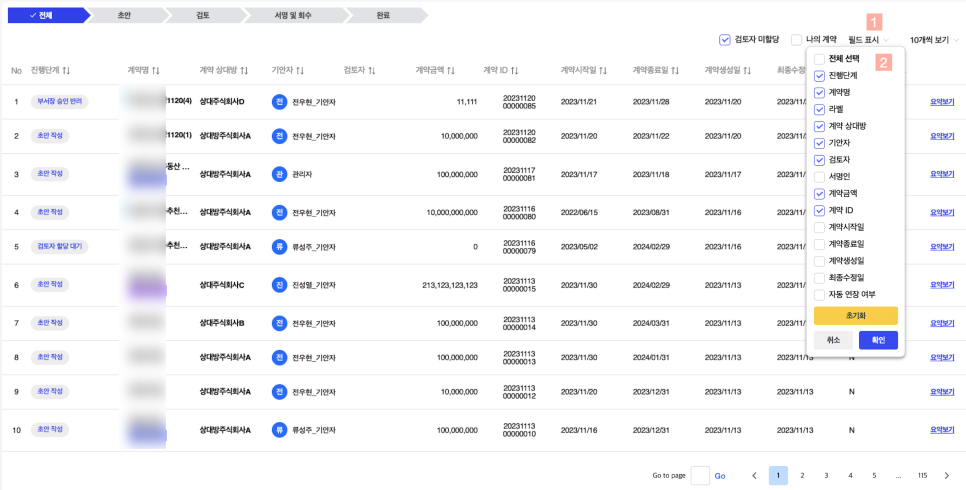
- 1 ) 리스트 우측 상단 '필드 표시' 메뉴가 추가되었습니다.
- 2 ) 필드표시를 클릭 하면 선택할 수 있는 항목 리스트가 제공 되며, 원하는 항목을 선택하여 리스트에 적용할 수 있습니다.
- 3 ) 이제 원하는 리스트 항목을 선택하여 업무를 관리해 보세요. ^^
6. 통계
검토자 혹은 관리자 권한을 가진 유저에게 통계 메뉴를 제공합니다.
11가지 항목의 통계 기능으로 업무 현황을 빠르게 확인해 보세요.
▶ 통계
1. 통계 메인 ( 11가지 통계 항목 )
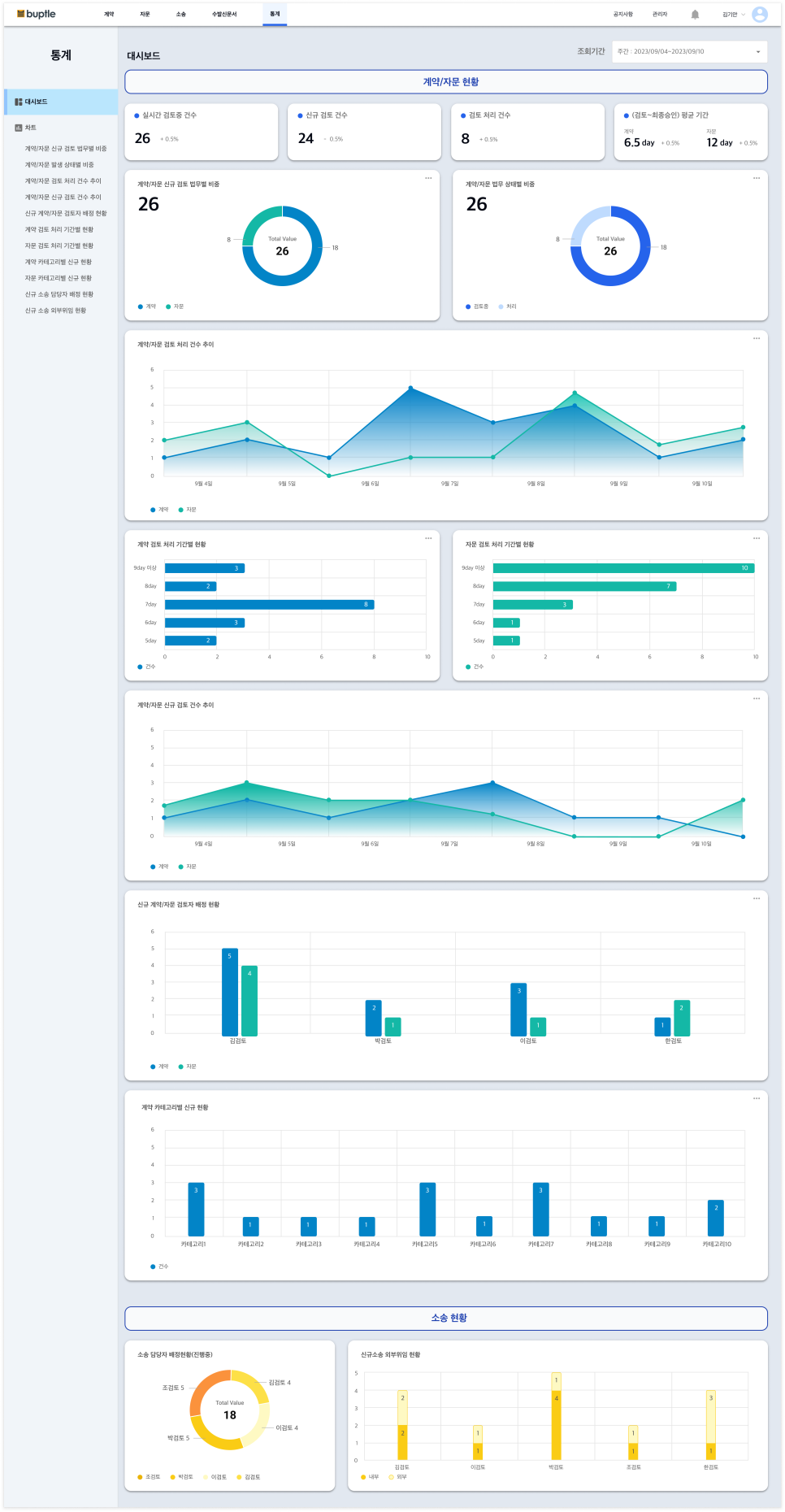
- 1 ) 통계메인 화면에서는 11가지 모든 항목을 순서대로 보여줍니다.
- · 계약/자문 신규 검토 건수
- · 계약/자문 상태별 건수
- · 계약/자문 검토 처리 건수 추이
- · 계약/자문 신규 생성 건수 추이
- · 신규 계약/자문 검토자 배정 현황
- · 계약 검토 처리 기간별 현황
- · 자문 검토 처리 기간별 현황
- · 계약 카테고리별 신규 현황
- · 자문 카테고리별 신규 현황
- · 신규소송 담당자 배정 현황
- · 신규소송 외부위임 현황
2. 통계 상세 항목
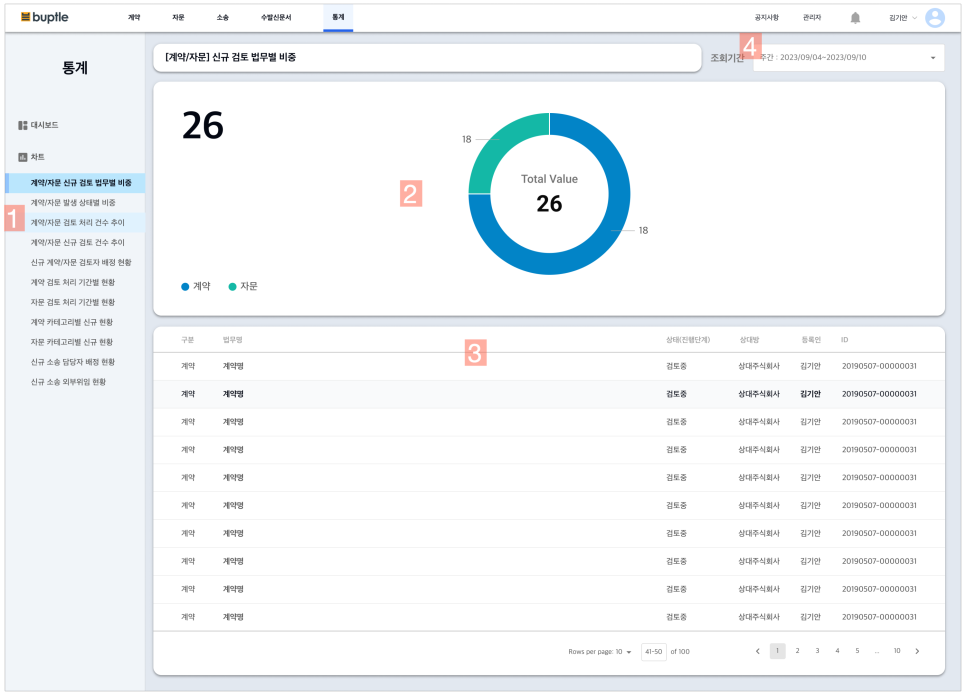
- 1 ) 좌측 11가지 통계 메뉴를 클릭 하면, 개별 상세 통계 화면이 제공 됩니다.
- 2 ) 통계 그래프를 통해 현황을 쉽게 확인 할 수 있습니다.
- 3 ) 해당 통계와 연관된 업무 리스트를 보여줍니다.
- 4 ) 조회기간은 기본 월단위로 설정되어 있으며, 임의로 기간을 변경하여 조회할 수 있습니다.
* 통계기능은 향후 업데이트를 통해 지속적으로 고도화 할 예정에 있으니, 통계 기능에 대한 의견이 있으면 언제든 법틀 서포트 (support@buptle.com) 로 의견을 보내주시기 바랍니다.
버그 픽스
그 외 추가적인 버그 픽스로 안정성을 개선 했습니다.
법틀이 제공하는 새로운 기능을 통해 법무를 더욱 쉽고 편하게 관리해 보세요. ^^
법틀 법무관리 시스템에 대해 의견이 있다면 언제든 (support@buptle.com) 으로 전달 주시기 바랍니다.
법틀은 고객의 의견을 하나하나 확인하여, 더 나은 사용성을 위해 개선합니다.