-
1 ) 디자인 개선
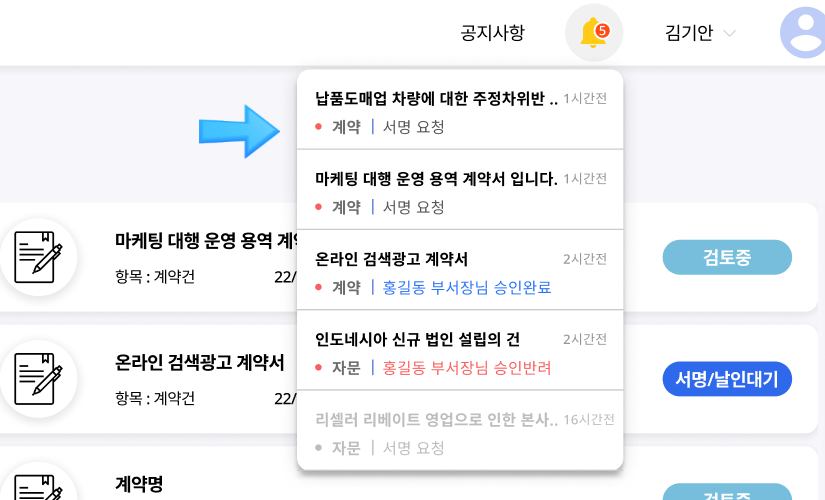
· The part that was marked as 'approval guide' in the existing text has been changed to a nice and prominent 'Bell'.
Replace the approval guide phrases with the bell shaped design -
2 ) UI 개선
- · All alerts are marked with "bell" on the side
- · List the alarms in the order of the most recent alarms when you click 'bell'
- · If you click on the alert 'bell', you can check your tasks first by marking the 'current work stage' for each task
- · Alerts are requested to be reviewed, signed, circulated in blue; rejected or suspended in red; and gray for other identified alerts in black
- · Checked alerts are grayed out and deleted from alerts when completing tasks after checking the alert
Provides changes to alert list design, work stage, color, etc. -
3 ) 알람대상 개선
· In contrast to the approval guide that was provided for the existing reviewer/final approver, a notification is sent to the draftsman, reviewer, department head, and final approver in case of a change in work status
-
4 ) Other
- · Provides indication of alert occurrence time based on current time (e.g. 15 minutes before)
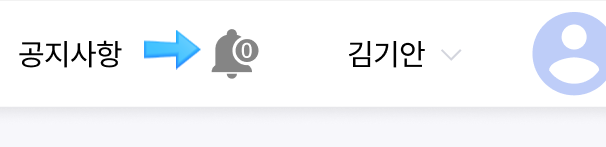
- · Disabled and grayed out if there is no alert list
If there is no alert, it is marked with a gray bell
릴리즈 노트 Ver. 2.8.2
Buptle Spring Front Yard (Cloud) Bug Extermination (Bug Fixes) and Garden Clean Up (Usability Improvements) Notice
On April 15, 2023, Buptle conducted leaf cleaning (bug fixes) and winter preparations (stability improvements)
to ensure that clients using Buptle (Cloud) Service
can freely and comfortably explore Buptle like it's their front yard.
2.8.2 Release Notes April 15, 2023
Buptle Spring Cleaning Notice
Pest control (Bug Fixes)
- We have fixed bugs that came up intermittently while using Buptle Solution and caused inconvenience to users
- This release is for customers using version 2.8.1, not for customers using version 2.7.
- We plan to continuously check reported and found bugs and fix them every two months.
- 1 ) 리스트 화면 페이징 유지
- · Resolve the issue where navigating back from a detailed view, after accessing it from a list beyond page 2, returns to page 1 instead of the original page.
- 2 ) 버튼 중복 클릭 오류
- · Resolve the issue where rapid, consecutive clicks on buttons like "Review Request" and "Send Draft to Drafter" cause duplicate entries in the history.
- 3 ) 계약요약정보 화면 깨짐 현상
- · Resolve the UI issue where the contract summary information on the contract list screen breaks when the content is too lengthy.
In using..., we have fixed 146 hidden bugs that could have been causing issues.
Garden clean up (usability improvements)
- We have improved the existing approval notification feature so that all users can receive notifications necessary for their tasks.
Improved usability of alert functions
Other small improvements
-
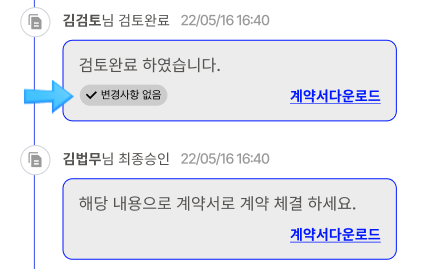
If there is no updated document on the progress status screen, a feature has been created to show that there will be no changes to the document on the screen.
Mark "No change" if there are no changes Buptle will minimize inconvenience to customers and improve usability with regular releases.
Thank you.
Go to Blog Update News